Review only what changed
Review mode shows one step at a time, starting with the steps that need a person: failed and returned steps, criteria the AI was unsure about, steps that changed since the last accepted run and steps with open comments. Steps that did not change keep the approval someone gave them before.
Open review mode
- Open the review link from the pull request or the e-mail (it ends in
#review), or open the run and press Q.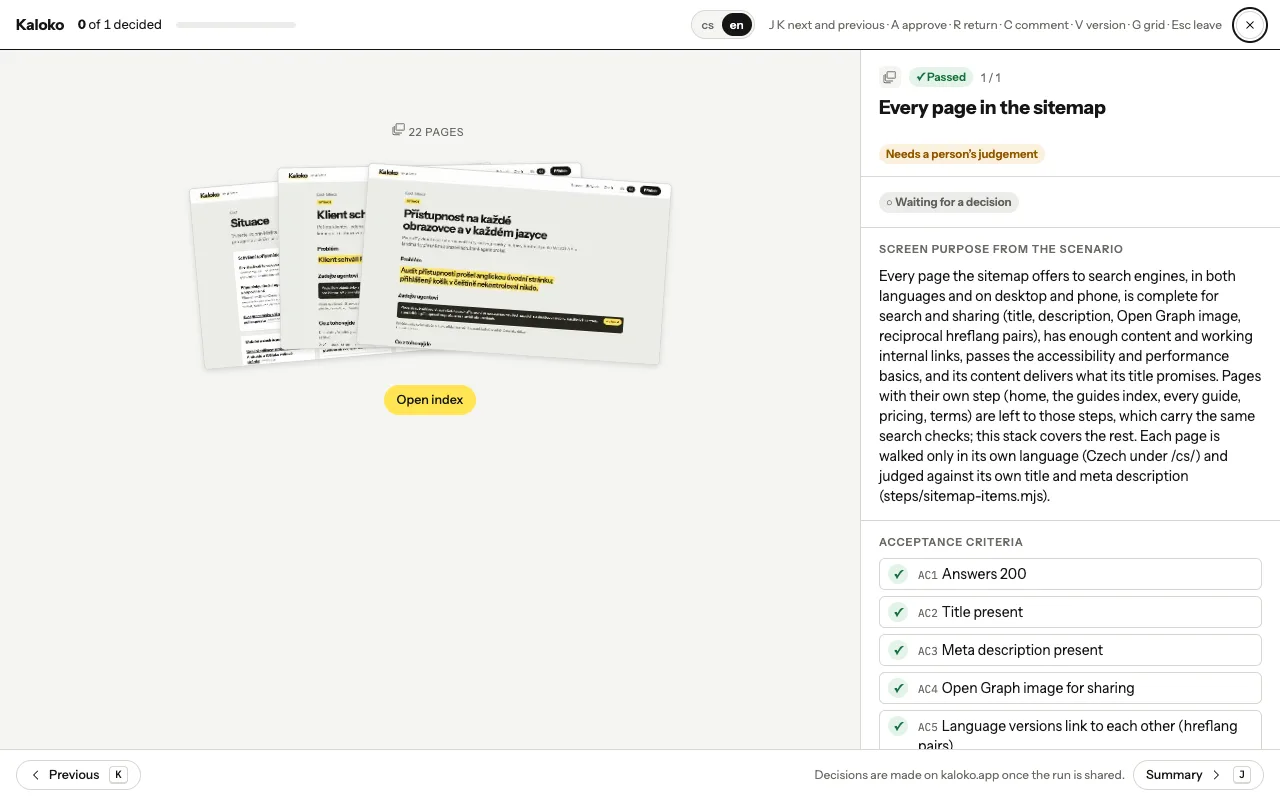
Review mode · - The step you are deciding sits next to the accepted run, so you see what moved.
Decide with the keyboard
| Key | What it does |
|---|---|
| J / K | next and previous step |
| A | approve the step |
| R | return the step with a note |
| C | comment |
| G | the step in every language and screen size |
When every step is decided, accept or return the whole run.
Look closer
In the large view you can compare the two runs side by side, as a difference, with Swipe (drag a divider across both screenshots) or with Onion skin (this run faded over the other). To point at a problem, draw a box, an arrow or a line on the screenshot while you write the comment, or paste a picture.
Approvals carried over
A carried approval names who gave it and in which run. If you think the step needs another look, revoke it and the step waits again. A carried approval never accepts the run for you.